
End-of-season clearance sales aren’t just about discounts. They help you clear space, bring in cash, and prep for what’s next, without slashing prices to the bone. With the right timing, setup, and promotion, your Shopify clearance event can boost profits, not just dump products.
We’ve all had stock that didn’t move. Maybe you ordered too much. Maybe demand just dropped. Either way, it’s money sitting in boxes. An end-of-season clearance discount gives those items a second chance. It also gives deal-hunters a reason to shop now, not later.
You don’t need to overdo it. Start with light markdowns. Watch what moves. Learn what doesn’t. This guide will walk you through everything from choosing the right timing to setting up discounts, managing to ship, and promoting your sale without sounding like a megaphone.
Let’s help your store breathe again.
Here’s the truth: timing makes or breaks a clearance sale. Doing it too soon, and you lose full-price buyers. Waiting too long, and no one wants the items.
Here’s a quick breakdown of when and why to run one.
Right before a new season
If spring is around the corner, start clearing out winter items. People are already thinking ahead. If you wait too long, they’re over it.
After big sale events
BFCM, holidays, or whatever seasonal discount you just ran, ride the leftover traffic. Toss the slow-selling items into a quick clearance and keep them moving.
When new stock shows up early
Got boxes arriving and nowhere to put them? Then act. Run a fast sale and make space now. Otherwise, good products get buried.
End of quarter crunch
Trying to hit your numbers? This helps. Even a few extra orders can push you past your goal.
When a product’s losing steam
You know when something’s fading. It’s not exciting anymore. That’s your last chance. If you hang on, it will just die on the shelf.
You don’t need a fancy plan. Just watch your store. Notice what’s slowing down. Then act. Small, quick clearances beat big, late ones every time.
Clearance sales aren’t just about offering discounts. They’re about making space, moving on, and cleaning up before new products arrive. However, to execute this without chaos, you need to prepare your store first. Here’s how I typically do it:
Start with your shelves
Go through the items that have been sitting for too long. If you forgot they were there, your customers probably did too. Tag those items in Shopify so you can sort them quickly.
Create a clearance section
Make a collection of those items. Keep it separate from everything else. I usually name mine “Last Chance” or “Almost Gone.”
Determine your pricing
Don’t leave it to chance later. Decide on the type of markdown that makes sense now. Big discounts? Bundles? Gradual price drops? Set everything up ahead of time.
Update your product pages
A dusty listing won’t sell. Check your photos. Trim any old descriptions. Add a quick note that it’s part of the sale, and if it’s a final sale.
Organize your homepage and menu
Place the clearance section in a prominent location. Mobile especially. Don’t make customers search for it.
Test the cart
Try purchasing one of your clearance items. Is the discount showing up? Is shipping behaving correctly? It’s better to find out now rather than during the sale.
Prepare for increased traffic
These types of sales can lead to significant spikes in visitor traffic. Confirm that your site loads quickly and can handle the extra traffic without crashing. Shopify usually handles this well, but it’s always a good idea to double-check!
Write your messages in advance
Draft the email. Line up the posts. Get your links right. It’s easier to publish when everything is already done.
Back up your data
Before you start changing prices or tags, download your product information, just in case.
Running a clearance sale doesn’t mean you have to burn your margins. You need to be smart about how you price things.
Figure out your floor
You need to know what you can’t go below. This includes your product cost, fees, shipping, and any other expenses you incur. Only dip under that if it’s dust-collecting stock you’re ready to clear, no matter what.
Simple discounts work best
A straight 30% or 50% off is easy for people to understand and will move more products, faster. There’s no need for mental math or confusion.
Reward Trigger orders
Try deals like “Buy 3, get 40% off.” It nudges people to grab more. This one works great if you’re dealing with repeat buyers or B2B customers.
Pair the slow stuff with something that sells
Got a hero product? Use it to carry a slow one. Bundle them together and price it in a way that feels like a deal without making the good item feel cheap.
Create a deadline
A two-day price drop gets attention – no need to run the sale for weeks. Think of a Shopify flash sale. Urgency helps people decide more quicker.
Tweak as you go
Watch what’s selling. Adjust if needed. Some items may need a second markdown, which is normal. That’s normal.
Running a clearance sale is great. However, setting it up in Shopify can feel clunky. Manually tagging products, creating discount codes, and double-checking what’s live eat up your time and still leave room for errors.
Many third-party discount apps let you create smart, rule-based discounts without touching code. You can target just the items you want to clear, set up volume deals, and even make it all look good on your storefront.
Here’s a step-by-step guide to help you get your campaign up and running fast with full control and zero stress.
Go to your Shopify admin. Tag the products you want to clear out. You can also filter by product type, vendor, or collection if tagging feels too manual.
Tip: Use a tag like clearance-summer or endofseason2025 to stay organized.
Choose “Create New Discount Rule” from your app and choose the discount type. These apps let you pick different rules depending on how you want to clear inventory:
Fixed % off (e.g. 40% off all clearance)
Tiered discount (e.g. Buy 2, get 30% — Buy 5, get 50%)
Bundle pricing (combine slow-moving with bestsellers)
Pack size discount (for bulk or B2B orders)
Pick what fits your goal and product type.
Select your clearance-tagged products or the collection you made. Apply the discount rule only to those items.
Bonus: You won’t have to worry about it affecting your main catalog.
With the app’s layout editor to tweak:
Banner text (e.g. “Last Chance Clearance”)
Font size and color
Button color and labels
Background visuals or product badge
No coding is needed.
Want it to run just for a week or 48 hours? Set the start and end times. It’ll auto-expire when done. You can also schedule it.
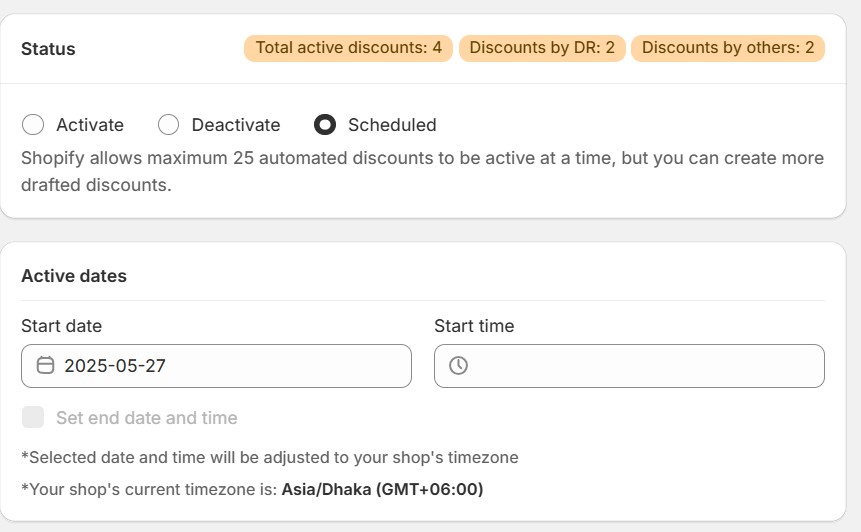
Click Preview to see how it looks on your storefront.
Happy? Hit Publish.
✅ That’s it. You’re live.
Now promote it. Use your homepage banner, email list, or pop-ups. And don’t forget to check analytics to see what’s selling best.
Running an End-of-Season Clearance Discount sale isn’t just about dropping prices. You’ve got to keep your backend tight—otherwise, the chaos eats your margin. Here’s how to keep it clean and profitable:
1. Sort Your Inventory Before You Launch
Conduct a quick stock check to identify the items you want to remove, including old-season, dead-stock, and discontinued items.
Tag them in Shopify: Use a clear tag, such as clearance-2025, so you can filter them easily later.
Bundle smart: Pair slow movers with fast sellers to offload both simultaneously.
Set stock limits: Disable “Continue selling when out of stock” to avoid overselling.
Pro tip: Use Shopify’s inventory report to identify aging stock and track its location.
2. Simplify Shipping
Pre-pack what you can: If the SKUs won’t change, get ahead of fulfillment.
Flat-rate or free shipping over X: This encourages customers to add more items to their cart.
Use rules when using apps or 3PLs: Automate shipping logic to keep things flowing smoothly.
Pro tip: If you’re working with a fulfillment partner, provide them with advance notice of the expected volume.
3. Set Return Rules (and Show Them Clearly)
Make it clear: Final sale? Say it on the product page, in the cart, and emails.
Use Shopify’s return reasons: Helps spot patterns and improve future clearance picks.
Offer exchanges instead: If returns feel risky, swaps keep customers happy without restocking.
4. Keep an Eye on the Numbers
Track what’s working:
Use Shopify Flow or apps to automatically hide low-stock items when their quantity reaches a specified threshold.
Clearance sales can bring in quick orders, but they also come with risks—confused shoppers, return issues, and trust problems. Here’s how to avoid those and make sure customers still feel taken care of.
Be Honest About What They’re Getting
Make sure your discounts are real and clearly explained. If something used to be $50 and is now $20, great say that. But don’t inflate the “original” price just to make the sale look bigger. Also, if an item is a final sale, don’t hide it. Mention it clearly on the product page, in the cart, and in the email confirmation. When people know exactly what they’re buying, they’re less likely to feel misled.
Keep Shoppers Informed Every Step of the Way
Update your store banners, product descriptions, and emails to reflect what’s going on. If stock is limited, say so. If returns aren’t allowed on clearance items, make that known. You’re not trying to scare anyone off. You’re just making sure people feel prepared and in control.
Use Reassuring Language on Your Site
Small bits of text can make a big difference. Adding simple notes like “Ships within two days, even during sales” or “Only a few left” can give buyers the extra confidence they need to complete a purchase. These quick messages answer silent questions before they’re even asked.
Offer a Thoughtful Alternative to Returns
If you don’t accept returns on clearance, consider offering store credit or including a small thank-you gift to soften the policy. And if someone has a question, make sure your FAQ page or support chatbot gives fast, clear answers. It’s not just about what the policy says—it’s about how the customer feels when they read it.
Keep Your Communication Personal
Even if you use automation, your emails should feel like they’re from a real person. Instead of a cold “Your order has been placed,” try something like “Thanks for your order—we’ll get it packed up and out the door soon.” Sign off with a team member’s name, not just “Customer Support.” A little warmth goes a long way, even during high-volume sales.
Bonus Tip: Think Beyond the Sale
Once the clearance order is fulfilled, that customer is still your customer. Follow up with a friendly note and a suggestion for what to check out next—maybe your new arrivals or an invite to your VIP list. When people feel good about how they were treated during a sale, they’re much more likely to come back.
Want to clear out products without drowning in manual work? Smart automation and bundling tricks can help you move stock faster, protect profit margins, and give customers a better shopping experience, all right inside your Shopify store.
Shopify’s built-in tools (or third-party apps) let you apply discounts automatically. You can set rules like “Buy 3, get 30% off,” schedule the start and end times, and skip the promo code drama altogether.
If you’re on Shopify Plus, you can do more. Automate things like tagging products with low stock, moving stale items into clearance or sending follow-up emails based on customer behavior. It saves time and helps you catch sales opportunities as they happen.
Pair slow movers with bestsellers, like “Buy 2 full-price, get one clearance item half off.” Use bundling apps to manage the logic behind the scenes.
Set up your campaigns in advance. Send last-chance emails. Show targeted pop-ups when shoppers browse clearance pages. Timed right, they nudge buyers to act fast.
These little systems work quietly in the background. So you can focus on running your business.
Even the best discounts don’t help if no one knows about your sale. Promotion turns a quiet markdown into a busy, money-making event. Here’s what to do:
1. Use Targeted Email Campaigns
Send emails to the right groups; past customers, VIPs, deal hunters. Use clear subject lines like “Clearance Starts Now – Up to 50% Off.” Keep emails simple and mobile-friendly. Send a teaser before the sale, a launch email, and a last-chance reminder.
2. Promote on Social Media
Post countdowns and deal reminders on Instagram, Facebook, and Twitter. Work with influencers or brand reps to show off clearance picks. Run short paid ads to people who visited your site or left carts behind.
3. Highlight Clearance on Your Website
Put a banner or hero image on your homepage about the sale. Add countdown timers to show urgency. Create a clear, easy-to-navigate clearance collection page sorted by discounts or popularity.
4. Use Timed Pop-Ups
Show pop-ups with offers like “Extra 15% Off Today Only.” Make sure they appear at the right time (on entry, scroll, or exit) and work on mobile.
5. Try SMS Alerts
Send short, urgent texts to opted-in customers. Example: “Clearance starts now! Shop here: [link].” Keep messages few but timely.
6. Set Up Retargeting Ads
Remind visitors who didn’t buy with ads on Facebook, Google, or TikTok. Show the exact products they looked at with updated prices.
7. Add Urgency Visuals
Use timers, low-stock notices, or progress bars to show the sale is ending soon or inventory is running out.
8. Write a Blog Post
Share a quick guide or highlight clearance favorites. This helps with SEO and gives loyal customers more reasons to shop.
Clearance sales can work well but only if you run them with care. One of the biggest mistakes is over-discounting. Dropping prices too low can hurt your brand and make it harder to sell at full price later. Instead of slashing everything, try bundling slow-movers with high-margin items. That way, you protect your profit and still move stock.
Another common issue? Poor inventory planning. Promoting products you barely have or worse, items already sold out leads to canceled orders and unhappy customers. Use Shopify’s inventory tools to track stock and set automatic limits so you don’t oversell.
Next, watch your return policy. If something is a final sale, make it clear. Add that note to the product page, cart, and order confirmation. Surprises lead to chargebacks, and no one wants that.
Also, don’t just mark down products and wait. If you don’t promote your sale, people won’t know it’s happening. Merchants who skip email, popups, or retargeting often end up with disappointing results.
And finally, track everything. Look at what sold, what didn’t, and why. If you skip this step, you’ll be guessing next time instead of planning.
Your sale is done but your work isn’t. This is the time to look back, learn, and get ready for what’s next.
Start with the numbers. What sold the fastest? What bundles worked best? Which discounts drove bigger carts? Shopify’s analytics can show you. Take notes now, so your next clearance event runs smoother.
Then look at your customers. Thank the ones who bought. A simple follow-up email with a small perk can turn deal-seekers into loyal shoppers.
Tidy up your store. Hide sold-out or discontinued products. Remove any expired banners or SEO tags tied to your sale.
Lastly, take ten minutes to review what went well and what didn’t. Were there delays in shipping? Did your return system hold up? Jot down your answers. It’ll save you time and stress next season.
End-of-season clearance sales can make or break your business. I know it sounds a bit scary. But you can easily win this event if you plan and execute it properly. These sales aren’t just for clearing shelves. They’re a chance to learn, grow, and build stronger connections with your customers. Don’t miss that. Try and test different things. And you’re good to go!
Get started with our free plan or unlock premium features with a 14-day free trial.
30-day money-back guarantee!



 English
  日本語
日本語  Français
  Deutsch
  Español
  简体中文
简体中文  Italiano