If you’ve seen “Shopify Spring ’26” mentioned somewhere and want to know whether it touches your discounts, here’s the short version: yes, several changes affect how promotions work, and this covers the ones that matter most for setting up and running them. Shopify Spring ’26 discount changes include same-line-item product discount stacking, market-based discount eligibility, shareable discount links with campaign tracking, QR codes for in-store redemption, and variant-level publishing that pairs naturally with variant-specific discounting. Some of these are genuinely new capabilities. Others are existing platform behavior that matters more now because of what changed around them.
This post walks through what changed for Shopify discounts in Spring 26, what’s actually new versus what’s always been true, and what to check in your own store before assuming nothing needs attention.
TL;DR
Here’s the honest split between new capability and existing behavior that’s newly relevant.
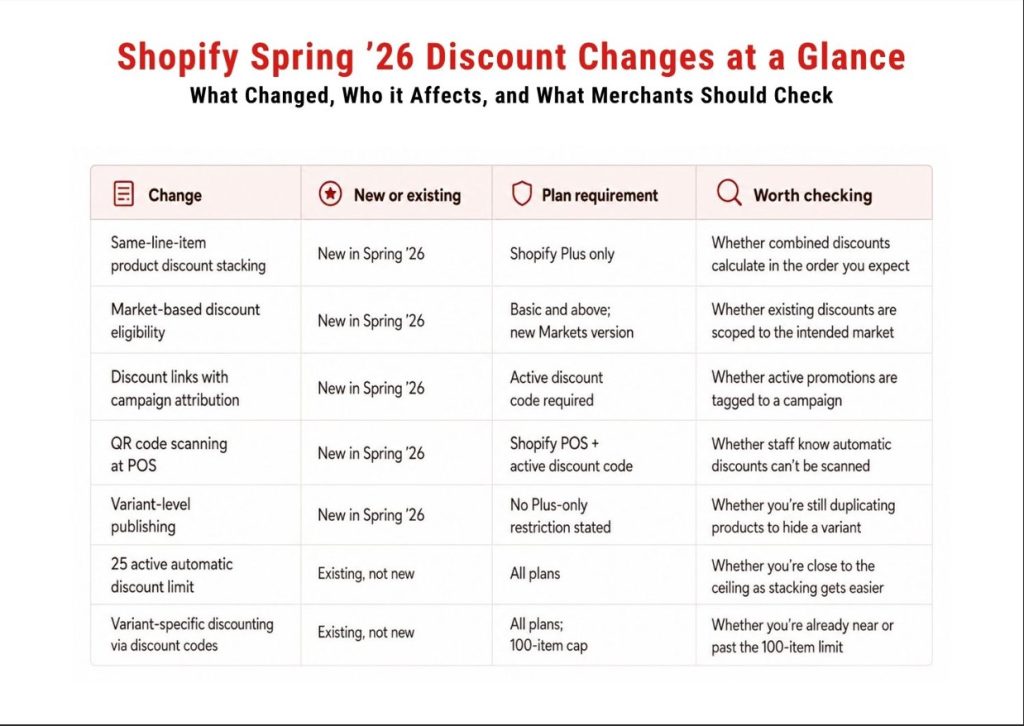
Knowing which row a change falls into matters. A merchant who assumes everything here is brand new might rebuild something that already worked. A merchant who assumes nothing changed might miss a genuinely new option.
The headline stacking change in Spring ’26 is same-line-item stacking: you can now combine multiple product discounts on the same product, for example a loyalty discount and a seasonal discount applying to the same item. Configuring this requires tagging your discounts and setting them to combine with matching tags, and it’s available only to stores on the Shopify Plus plan.
Separate from that, Shopify has long supported combining discounts across classes. Every discount falls into one of three classes: product discounts applying to specific items, order discounts applying to the cart subtotal, and shipping discounts modifying shipping cost. All merchants can combine order discounts with free shipping discounts, product discounts with free shipping discounts, and product discounts with other product discounts on separate items. Combining product discounts with order discounts, or order discounts with other order discounts, requires meeting specific eligibility requirements around checkout customization, according to the same documentation. These cross-class rules aren’t new to Spring ’26, but they’re the context you need before layering the new same-line-item stacking on top.
The calculation order matters once you’re actually stacking anything. Shopify applies product discounts first, then order discounts apply to the revised subtotal, then shipping discounts apply last. Shopify’s documentation walks through a same-line-item example: a $100 item with a 10% clothing discount applied first drops to $90, and then a $20 fixed discount applies to that already-discounted $90, landing at $70, not $80. If you’re stacking a percentage and a fixed amount, the sequence changes your actual margin, and it’s worth running the math before assuming two promotions add up the way you’d expect.
One detail that gets missed: an app-created discount only combines with a native Shopify discount when the app supports the relevant discount classes and both discounts are individually configured to allow that combination. Developer support alone doesn’t guarantee two discounts will stack, the combination setting on each discount also has to permit it. If combinations aren’t working the way you expect, checking both the app’s capabilities and each discount’s combination settings is the right first step.
Consolidating and reviewing your combination settings before a big promotion matters regardless of which app you use. DiscountRay can centralize the creation of several rule-based and stacked promotions, though each combination should still be tested through your storefront and checkout before launch, the same as any native combination.
This is the change with the clearest B2B implications. Shopify Spring ’26 update added a market eligibility option to the discount editor, an eligibility selector that lets you assign any code-based or automatic discount to one or more markets. Customer segment eligibility already existed before this update, what’s new is being able to scope a discount by market the same way, plus new filters that let you sort the discounts list by market, segment, or specific customer.
You can assign discounts to B2B, country or region, and retail markets, but not to channel-specific markets. By default, discount codes still work across all markets unless you restrict them. One constraint worth knowing before you plan a campaign: market eligibility and customer segment eligibility are mutually exclusive on a single discount.
Shopify doesn’t natively let one discount require both a specific market and a specific customer segment at the same time. Two separate discounts, one scoped to the market and one scoped to the segment, would make the promotion available more broadly, to anyone who meets either condition, not only to customers who meet both. If you genuinely need the intersection, market and segment at once, that requires custom discount logic rather than simply creating two discounts.
This is genuinely useful for running an online-only flash sale that doesn’t leak into your retail locations, or for keeping a wholesale volume pricing offer inside your B2B market without it showing up to direct-to-consumer shoppers. For stores running personalized B2B pricing, DiscountRay‘s segment-based rules sit alongside this native eligibility selector rather than replacing it. The native tool handles market or segment targeting well on its own, and a dedicated app becomes more useful once you need several segment-specific offers managed in one place.
Whether a wholesale tier is better handled through Shopify’s native B2B volume pricing or through DiscountRay’s segmentation usually comes down to how many pricing tiers you’re managing and how much control you need over eligibility.
This isn’t a Spring ’26 feature, it’s a standing platform limit that’s easy to overlook until stacking makes it more likely you’ll bump into it. Shopify caps stores at a maximum of 25 active automatic discounts, and that count includes app-based discounts, according to Shopify’s Help Center. This is a store-wide limit, it applies to how many automatic discounts are active at once regardless of whether any of them overlap on the same order. Customers separately can use a maximum of 5 product or order discount codes and 1 shipping discount code on the same order.
If an automatic discount stops applying and you can’t figure out why, checking whether you’ve hit that ceiling is one of the first things to do, per the same documentation’s troubleshooting guidance. With same-line-item stacking now available on Plus, it’s worth auditing your active automatic discounts periodically and deactivating ones you no longer need, rather than letting old seasonal promotions pile up unnoticed, even if your current promotions don’t visibly overlap.
Shopify added the ability to generate a shareable link or QR code for an active discount code, and to tie that link directly to a marketing campaign for attribution. This applies to discount codes specifically, automatic discounts don’t have a code to share or scan. From your Shopify admin, you open a discount, select Promote, then Get a shareable link, and you can choose an existing marketing campaign so its UTM identifier and source get added automatically. This campaign tracking option shipped as its own update.
On the retail side, staff can scan the same QR code in Shopify POS to apply the discount at checkout. This update works with product-specific and order-level discount codes, and automatic discounts aren’t included since there’s no code to scan.
For anyone running a promotion across email, social, and in-store at the same time, this closes a real gap. You can finally see which channel a discount code is actually driving revenue from instead of guessing. If you’re running the same offer through a creator partnership, an email blast, and a printed insert, tagging each one with its own campaign link is worth doing before your next launch, not after you’re trying to explain the numbers.
Yes, and this has been possible for a while, it’s more relevant now because of variant-level publishing. Shopify shipped variant-level publishing in Spring ’26, which lets you control which variants are visible on each sales channel or catalog without deleting variants or creating duplicate products. Shopify describes merchants using it to retire discontinued options, restrict region-specific variants to the right markets, or offer bulk-quantity variants only to B2B customers.
Discounting a single variant instead of a whole product is native functionality too, not something Shopify added this cycle. You can apply a discount code to specific variants of a product, and it applies to all quantities of that variant in the cart. The real constraint is scale: a discount code can apply to up to 100 specific customers, products, and variants combined, and going over that limit throws an item entitlements error. Collections can’t hold individual variants either, so a collection-based discount always applies to every version of a product, not just the variant you meant to target.
That’s the actual gap for stores with a lot of variants. Not that Shopify can’t discount a variant, it can, through a discount code, but that doing it across more than 100 variants at once, or without hand-picking every variant in the discount editor, is where a dedicated app like DiscountRay becomes the more direct option rather than filling something Shopify has no native answer for at all. If you’re running a clearance on one size or color across dozens of products and staying under the 100-item cap, that’s where the native picker starts costing you real time even though it technically works.
Given all of the above Shopify spring ’26 discount changes, here’s what deserves an hour of your time this quarter rather than a rebuild.
Review your active automatic discounts and confirm you’re not close to the 25-discount ceiling, regardless of whether your promotions currently overlap.
Check whether any app-based discounts are supposed to be stacking with native ones, are actually configured to combine, and are actually doing so. If you sell into more than one market or run a separate B2B channel, check whether your current discounts are scoped the way you think they are, since discounts default to all markets unless you restrict them.
If you’re running any promotion through multiple channels at once, set up campaign-tagged discount links before your next launch instead of reconstructing attribution afterward. And if you’ve been duplicating products just to discount one variant, variant-level publishing plus the native variant discount code might already solve that without an app, unless you’re working across more variants than the 100-item cap allows.
Do I need to review anything if I’m only running one discount at a time?
Some of this still applies. Stacking rules mostly matter once discounts overlap, but the 25-discount limit is a store-wide cap, and market targeting, campaign links, and QR codes can all matter even when a customer only ever receives one discount per order.
Will my app-based discounts combine with Shopify’s native discounts now?
Only if the app supports the relevant discount classes and both the app discount and the native discount are configured to allow that combination. Check with your app’s support team if combinations aren’t working as expected.
Does the 25-discount limit include app-based automatic discounts?
Yes. Shopify’s cap of 25 active automatic discounts includes any created through apps, not just discounts built directly in the admin.
Can one discount require both a specific market and a specific customer segment?
Not natively. Shopify treats market eligibility and customer segment eligibility as mutually exclusive on a single discount, so an intersection of both conditions requires custom discount logic rather than two separate discounts.
Can I discount one product variant without discounting the whole product?
Yes, natively, by applying a discount code to specific variants rather than the whole product or a collection. The limit is 100 items per discount code across customers, products, and variants combined.
Shopify Spring ’26 discount changes aren’t a reason to assume your current setup is suddenly broken. Same-line-item stacking is a genuinely new capability on Plus, worth understanding through the calculation order before you rely on it. Market-based discount eligibility is the most useful change if you run a B2B channel or sell into multiple regions and want a promotion to stay where you put it, keeping in mind it can’t natively combine with segment eligibility on the same discount. Discount links with campaign attribution finally answer the “which channel actually drove this” question for merchants running multi-channel promotions. Variant-level publishing and variant-specific discount codes solve the duplicate-product workaround for anyone who’s been living with it, up to the 100-item cap.
Get started with our free plan or unlock premium features with a 14-day free trial.
30-day money-back guarantee!



 English
  日本語
日本語  Français
  Deutsch
  Español
  简体中文
简体中文  Italiano