Six discount engines, one app
DiscountRay runs six distinct discount types on Shopify. Each is configured in the app and applies automatically at checkout — except discount codes, which shoppers enter themselves.
01 / 06
Personalized discount
Target an offer by who is buying or what is in the cart, rather than discounting for everyone. This is the B2B and wholesale engine.
How you set it up
- Pick the condition: a customer, a customer tag or list, a country, a cart value, or order history
- Choose the reward: a percentage, a fixed amount, a free gift or free shipping
- Set active dates and whether it can combine with other discounts
This is the admin view — the setup screen inside the app. When every condition you set matches, the discount applies.
Offer condition(s)
You’ve included Germany
Then customers get
Condition preview
- IFCountryisGermany
Then customers get
20% discount
Interactive demo. Sample products and illustrative prices — the arithmetic is the app's own.
02 / 06
Unique discounts per variant
Set a discounted price on individual variants instead of one flat discount across a product. Useful for clearing specific sizes or colours without touching the rest.
How you set it up
- Pick a product, then choose which of its variants are included
- Add one or more quantity ranges, each with its own discounted price
- Variants you leave out keep their regular price
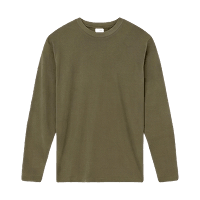
Everyday cotton long-sleeve
$26.00
Price breaks by size
Every size has its own price breaks. Pick one to see them.
| Buy | Get |
|---|---|
| 3 or more | $2.00 off |
| 6 or more | $4.00 off |
| 10 or more | $6.00 off |
Cross a break and the new price applies to every unit, not only the ones above it.
1 in cart. You pay $26.00, 0% off.
Size
Interactive demo. Sample products and illustrative prices — the arithmetic is the app's own.
03 / 06
Milestone offer
Reward shoppers for reaching a goal. Set thresholds by order value or item quantity, and attach a reward to each one.
How you set it up
- Set your milestone thresholds in ascending order, by spend or by quantity
- Attach a reward to each milestone — a discount, a free gift or free shipping
Everyday cotton long-sleeve
$28.00
10% off the order unlocked. Spend $36.00 more to get Free shipping!
- 10% off the order$50.00Reached
- Free shipping$120.00
- Free gift$200.00
Cart subtotal$84.00
3 in cart. You pay $75.60, 10% off.
Interactive demo. Sample products and illustrative prices — the arithmetic is the app's own.
04 / 06
Discount by code
Codes that shoppers enter at checkout, rather than a discount that applies automatically. Three modes: a single reusable code, a single-use code tied to one customer, or a bulk batch.
Try these codes
How you set it up
- Choose the mode: standard, personalized single-use, or bulk generation of up to 100,000 codes
- Set the value, what it applies to, who is eligible, minimum purchase and usage limits
- Optionally set codes to expire after a period of inactivity, and export the batch as CSV
Studio ceramic mug
15% automatic discount already applied
$108.00
You save $16.20
3 in cart. You pay $91.80, 15% off.
Interactive demo. Sample products and illustrative prices — the arithmetic is the app's own.
05 / 06
Bundle discount
Group products together and set a combined discounted price, so a multi-item purchase costs less than the sum of its parts.
How you set it up
- Choose the products that make up the bundle and set the discount
- Optionally add a free gift or free shipping
- Set active dates, and choose whether it can combine with product, order or shipping discounts
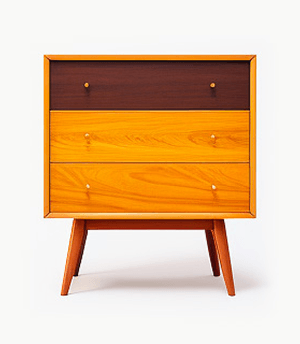
Walnut finish dresser
$180.00
Build your bundle
Pick a bundle size, then choose the finish for each piece. One combined price for the set.
You save $54.00
Interactive demo. Sample products and illustrative prices — the arithmetic is the app's own.
06 / 06
Quantity discount
Tiered volume pricing — buy more, save more. Set a minimum quantity and a discount for each tier, and the price drops as the cart quantity crosses each threshold.
How you set it up
- Set tiers: a minimum quantity and a percentage or fixed amount off for each
- Choose where it applies — all products, specific collections, or specific products
- Exclude any products or customers carrying a given tag
Walnut finish dresser
$180.00
Buy more & save more
Order more units in one go and the discount applies to every piece.
| Buy | Get |
|---|---|
| 2 or more | 5% off |
| 4 or more | 10% off |
| 6 or more | 15% off |
1 in cart. You pay $180.00, 0% off.
Size
Colour
Interactive demo. Sample products and illustrative prices — the arithmetic is the app's own.
Single-use codes that resist sharing
A personalized single-use code is checked twice at checkout: the buyer’s email must match the address the code was issued to, and the code must not have been redeemed before. Both checks run at the discount-evaluation layer, not only in the admin.
Single-use code
ExampleVIP-4821
Issued to ana@example.com
- AcceptedThe buyer it was issued to, using it for the first time.
- RejectedAnyone else, or a second attempt with the same code.
Margin safety
See the real cost before a code goes live
When a discount code stacks with an automatic discount, the two do not simply add up. DiscountRay shows the compounded result as you set the value, so a pair of modest discounts does not quietly become a large one.
The meter accounts for discounts DiscountRay manages. It cannot see discounts created by other apps on your store.
Combined discount
Example36%not 40%
1 − (1 − a) × (1 − b)
Green under about 30%, amber around 30–45%, red above about 45%.