折扣雷
菜单栏

Shopify 买一送一应用选购指南:商家安装前的检查清单

在选择 Shopify 买一送一应用时应该注意哪些方面?
Written by: Syeda Rehnoma Tanzom Reviewed by: Technical Support Team

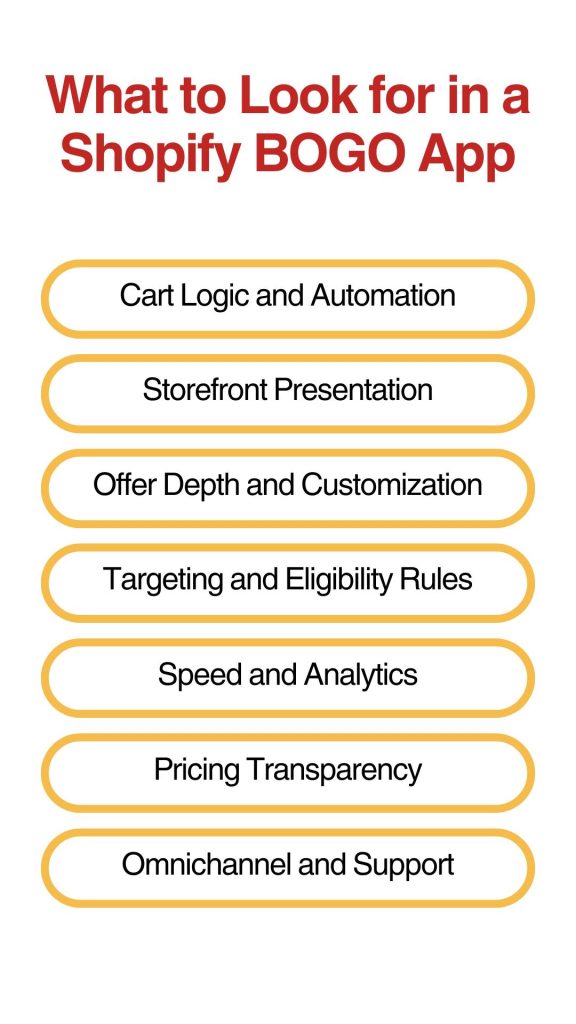
What to look for in a Shopify BOGO app comes down to seven things: cart automation, how it plays with your other discounts, visibility before checkout, offer depth, targeting precision, speed and reporting, 和 pricing transparency once you’re past the free plan. Get those seven right and almost any app on the Shopify App Store will serve you fine. Get one wrong and you’ll likely be migrating to a different app in a few months, with a half-finished promotion and a support ticket open.

This applies whether you’re moving off a manual setup or replacing a BOGO app you’ve already outgrown. The checklist doesn’t change based on where you’re starting from; it changes based on what your store actually needs.

概括
  • What to look for in a Shopify BOGO app comes down to seven things: cart automation, discount stacking compatibility, storefront visibility, offer depth, targeting controls, speed and analytics, and pricing transparency.
  • Shopify’s native Buy X Get Y discount handles a basic one-time promotion, but it won’t auto-add the free item to the cart, and it doesn’t create product-page badges or offer bars before the cart and checkout stage.
  • Discount stacking conflicts can be one of the easiest ways merchants lose margin or confuse customers without realizing it until the numbers look off.
  • Shopify POS compatibility depends on which POS subscription tier you’re on, not just which app you pick.
  • After you install anything, a short verification pass on your own theme and catalog confirms the app does what its listing promised.

Why a Feature List Alone Won’t Tell You What to Look for in a Shopify BOGO App

Most “best BOGO apps” roundups compare apps to each other: star ratings, price tiers, who has the flashiest widget. That’s useful once you know what you need, less useful while you’re still figuring out which features matter for your store.

Shopify’s native Buy X Get Y discount can handle a simple promotion without installing anything; select Buy X Get Y under Discounts, set your conditions, and save. For a single, short-lived offer with no complications, that’s genuinely fine. The friction shows up when you want the free item to appear automatically, when you want visibility before checkout, or when you’re running it alongside other active discounts. That’s where a checklist becomes more useful than a ranking, since things to consider before choosing a Shopify BOGO app depend on your catalog and your theme, not on which app has the most five-star reviews.

What to Look for in a Shopify BOGO App

Cart Logic and Automation

This is the part of the offer the customer actually experiences, so it’s worth getting right before anything else.

  • Auto-add and auto-remove. The free or discounted item should land in the cart automatically once the qualifying condition is met, and disappear automatically if the customer removes the trigger item. With Shopify’s native Buy X Get Y discount, customers have to add both the qualifying product and the reward product themselves; the discount only applies once both are already in the cart. If a shopper doesn’t realize they need to add the second item, they reach the checkout, see no discount, and assume something’s broken.
  • Discount stacking compatibility. Shopify organizes discounts into three classes: product, order, and shipping, and whether two discounts apply to the same order depends on whether you’ve explicitly set them to combine, not just on both being active. Buy X Get Y discounts carry an extra restriction on top of that: on every plan except Shopify Plus, products inside an active Buy X Get Y discount are ineligible for additional product discounts.
    if a customer applies a code that would otherwise apply to those products, Shopify keeps whichever discount gives the better overall value rather than applying both. A BOGO app that doesn’t clearly show its stacking settings, or one that silently overrides an automatic discount you already have running, can quietly cost you margin on every order it touches. Check whether it shows plainly which discount classes it will and won’t combine with.

Storefront Presentation

A BOGO offer that customers only discover at checkout isn’t doing its job. Shopify’s native automatic discounts apply once a cart meets the conditions, but that doesn’t extend to product-page badges, BOGO widgets, or offer bars before the cart and checkout stage. The deal is supposed to influence what gets added to the cart, and that influence has to happen before the customer reaches payment.

  • Visual widgets. Look for product-page badges, cart progress bars, or floating buttons that surface the offer while a customer is still browsing. These don’t need to be elaborate; they just need to be somewhere a shopper will see them before checkout.
  • Mobile rendering. A widget that looks fine on a desktop preview can crowd or cover the Add to Cart button on a phone screen. Test this on an actual mobile device before launching, not just in the app’s demo screenshots. This kind of issue shows up often enough in practice: a theme update or a particular section layout breaks a BOGO widget’s mobile placement without warning, and a desktop preview won’t catch it.

Offer Depth and Customization

Not every BOGO promotion is “buy one, get one free.” Make sure the app actually supports the version you plan to run, not just BOGO as a generic checkbox.

  • Deal type coverage. Confirm support for the specific structure you need: straight buy-one-get-one-free, a percentage off the second item, repeat logic like buy 2 get 2, or a cross-product version where the reward item differs from the trigger item. That last one technically falls under Buy X Get Y rather than classic BOGO, but check the app’s actual rule builder rather than its marketing copy.
  • Bulk and collection-level rules. If you’re running the promotion across a large catalog, look for an app that lets you apply a rule to an entire collection at once. Pairing SKUs one by one is manageable at ten products and a real time cost at two hundred.

Targeting and Eligibility Rules

A BOGO offer that runs identically for every customer in every region works fine for a simple seasonal push, but starts to fall short once you want control over who sees what. Shopify’s own discount management settings support eligibility by customer segment, so this isn’t an app-only feature; the question is how granular the targeting is once you’re running it through a dedicated BOGO app.

  • Customer segmentation. Check whether the app supports targeting by customer tag or group, useful for distinguishing VIP buyers from first-time visitors, or wholesale accounts from retail ones.
  • Location-based targeting. If you run region-specific campaigns, confirm the app can restrict an offer by geography rather than applying it storewide.
  • Campaign scheduling. Built-in start and end dates matter more than they sound like they should. Manually turning a promotion on and off around a holiday weekend is the kind of task that gets forgotten.

Speed and Analytics

These two are grouped together because merchants tend to notice both only after they’ve already become a problem.

  • Page load impact. Any BOGO app that adds storefront widgets, cart logic, or app embeds adds assets to your storefront, and Shopify’s guidance on store performance flags too many storefront-facing apps as a real driver of slower pages. A heavy app can hurt conversion in a way that’s easy to miss, since nothing looks broken, it just feels sluggish. Reviews can be a useful signal; a pattern of merchants mentioning slower load times after install is worth taking seriously. Test your own page speed before and after installing, rather than relying on the listing’s claims alone.
  • Campaign-level analytics. Shopify’s own Sales by discount report groups sales by the name of the discount, whether that’s an automatic discount name or a code entered at checkout, so you can see how often a specific BOGO promotion is used. A dedicated BOGO app can still go further than that native report, with redemption behavior, widget-level performance, and AOV impact tied to the individual campaign rather than just the discount name.

Pricing Transparency

Pricing transparency is one of the things to consider before choosing a Shopify BOGO app that catches people off guard most often, usually a few months after they’ve already built their promotion around a specific app.

  • Free plan limits. Pay attention to whether a free plan caps you by lifetime order count or monthly order count; those are very different limits, and the difference matters once you’re running a live campaign instead of testing one.
  • Where the pricing jumps. Some BOGO apps price by order volume, so the entry-level price on the App Store listing isn’t necessarily what you’ll pay once your store is doing real numbers. Check the cost at your store’s actual order volume before assuming the lowest advertised tier is what you’ll pay in six months.

Omnichannel and Support

If you sell anywhere besides your online storefront, or if you’ve ever needed help fast, this category is part of what to look for in a Shopify BOGO app that’s easy to skip past, but it deserves more attention than it usually gets.

  • POS compatibility, specifically. This isn’t a flat yes or no, and the answer depends on more than the app. Shopify’s own documentation on Buy X Get Y discounts is clear that for retail locations on the POS Lite subscription, these discounts can only be used in online checkout, not in person. POS Pro locations get the discount both online and in-store. If you sell in person, check your own POS subscription tier first, then confirm the app supports POS at all, since not every BOGO app does.
  • Support quality. Look for how quickly a developer responds to theme-specific conflicts, not just their stated response time. You may find reviews mentioning a BOGO widget breaking after a theme update, and the speed of the fix matters more than almost any other feature on this list.

Things to Consider Before Choosing a Shopify BOGO app Based on Your Store Type

Not every category carries equal weight for every merchant. A small store running one seasonal promotion a year has different priorities than a B2B wholesaler managing customer-group pricing alongside BOGO campaigns.

Merchant TypeTop Priorities
DTC, generalStorefront visibility, mobile rendering, offer depth
B2B / wholesaleCustomer segmentation, stacking compatibility with tiered pricing, bulk/collection rules
Small store, occasional promosPricing transparency (free plan limits), ease of setup, theme fit
Scaling store outgrowing native or basic setupDiscount stacking compatibility, campaign-level analytics, POS compatibility

If you’re running BOGO as part of a wider discount strategy, alongside volume pricing or B2B customer-group offers rather than as a standalone promotion, stacking compatibility and targeting matter more than storefront widgets. 折扣雷 is built around that use case; its Shopify App Store listing shows BOGO, B2B customer-group targeting, variant-specific discounts, and discount stacking sitting alongside its volume and tiered pricing tools, rather than BOGO being the only thing the app does. It’s a reasonable fit for a wholesale store that wants BOGO managed in the same place as its volume and tiered pricing.

After You Install, Confirm It Actually Works

A feature list tells you what an app is supposed to do; a short test on your own store confirms it actually does it. Running through a quick Shopify BOGO app checklist before launching a real campaign catches most of this: place a test order and check that the free item adds and removes correctly as you change quantities, open the cart on an actual phone and confirm nothing’s covering the Add to Cart button, and if you’re running the BOGO alongside another active discount, run a test checkout with both applied and check the final total matches what you expected.

None of this takes long, and it’s cheaper than finding out during a BFCM weekend that something doesn’t behave the way the listing said it would.

Shopify BOGO App Checklist: FAQ

Does Shopify support BOGO without a third-party app?

Yes, through the native Buy X Get Y discount type. It works for a simple, one-time promotion, but customers have to add both the qualifying item and the reward item to the cart manually since there’s no auto-add.

Will a BOGO app conflict with my other Shopify discounts?

It can. Shopify groups discounts into product, order, and shipping classes, and combinations have to be explicitly allowed in each discount’s settings. Buy X Get Y discounts have an extra restriction on non-Plus plans: products inside an active Buy X Get Y offer are ineligible for further product discounts, so check this in both your existing discounts and the new app’s settings before launching.

Do BOGO apps work with Shopify POS?

Some do and some don’t, and it also depends on your POS subscription. Buy X Get Y discounts only apply at online checkout for POS Lite locations, while POS Pro locations support them both online and in person.

Can I run a BOGO app on a custom or older theme?

Usually, compatibility issues show up more often on heavily customized or older themes than on current default themes. Test the widget’s placement after any theme update, since that’s a common point where BOGO displays quietly break

How do I know if a BOGO app is slowing down my store?

Check Shopify App Store reviews for repeated mentions of slower load times after install, and compare your own page speed before and after installing using your theme editor’s preview or a speed testing tool. A pattern across multiple merchant reviews is a stronger signal than any single complaint.

结论

None of these seven categories matter equally for every store, but skipping any of them tends to show up later as a real cost. Cart automation and stacking compatibility protect your margin and checkout experience. Storefront visibility and offer depth protect the conversion the promotion was supposed to drive. Pricing transparency and POS compatibility protect you from surprises once a campaign is already built around the app. Run through what to look for in a Shopify BOGO app before you install anything, and you’ll spend less time migrating between apps later. For how apps stack up once you know what matters to you, the breakdown of the best Shopify BOGO apps is a good next stop.

赛达·雷诺玛·坦佐姆

关于作者

赛达·雷诺玛·坦佐姆

eFoli, LLC 的内容撰写员

This article is written by Syeda Rehnoma Tanzom, an SEO content writer with 3+ years of experience specializing in eCommerce content. What makes the work here a little different? A close collaboration with support teams to understand what merchants are actually going through, their frustrations, their questions, and their wins. The goal is simple: write content that speaks to real problems, not just search engines.

When not buried in keywords and content briefs, you’ll find her nose-deep in a good book, binge-watching true crime documentaries or psychological thrillers, and occasionally switching gears with a feel-good rom-com.

本文由 DiscountRay 技术支持团队审核,该团队经常帮助 Shopify 商家测试折扣设置、客户资格、购物车行为以及与结账相关的折扣问题。
免费开始 – 高级功能 14 天试用!

开始使用我们的免费计划或通过 14 天免费试用解锁高级功能。
30 天退款保证!

在 Shopify 上查找
zh_CN简体中文