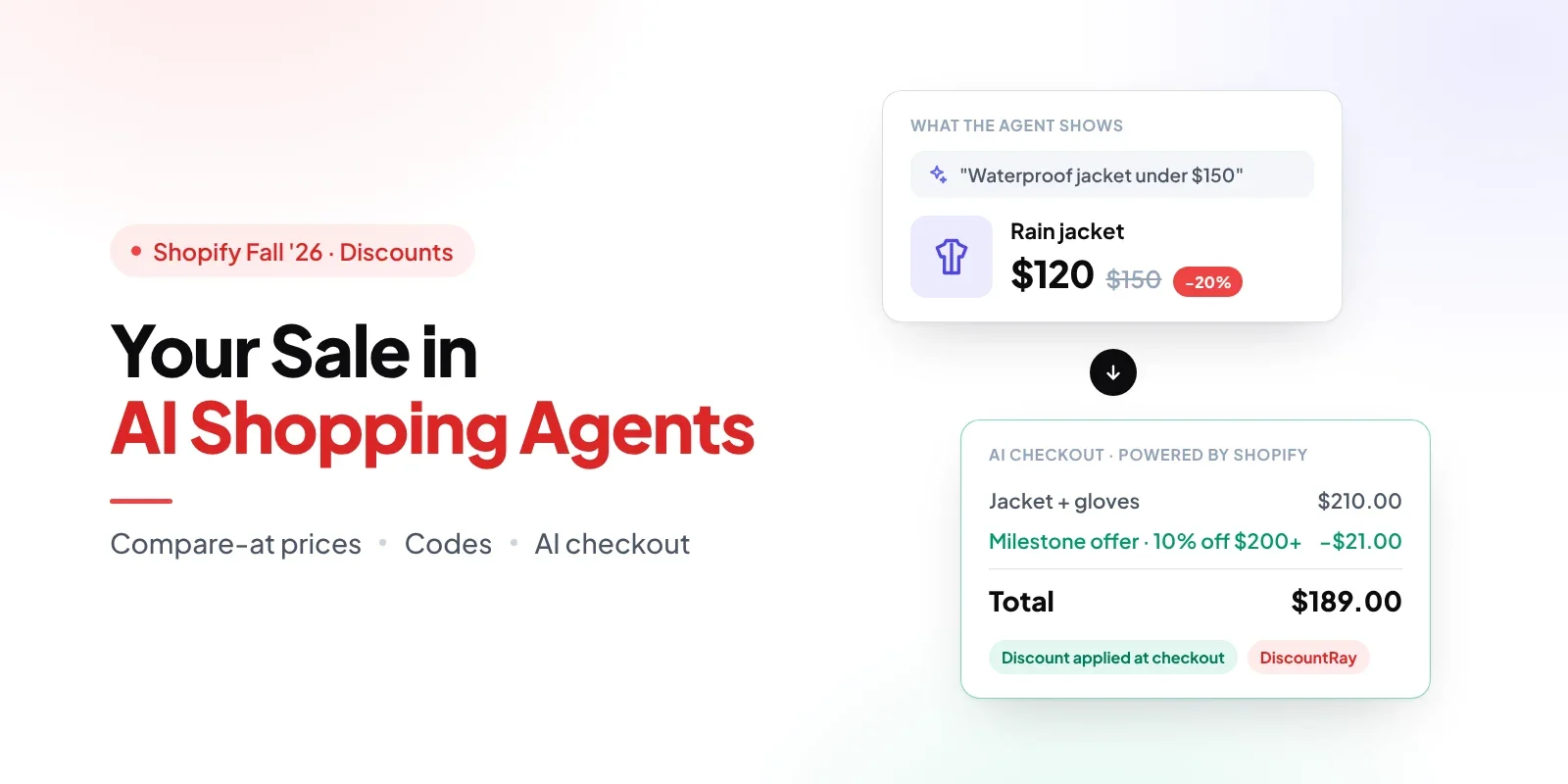
It's the week before Black Friday. A shopper opens Gemini and types, "Find me a waterproof jacket under $150." Your best jacket is 20% off, down from $150 to $120, with a red badge on the product page and a code in this morning's email. The question is whether Gemini knows any of that.
That's what most merchants want to know about Shopify discounts in AI shopping agents. Your sale was built for your own storefront, with badges, banners and a progress bar in the cart. An AI agent doesn't see your theme. It reads your product data through Shopify, compares you with other stores, and can send the shopper to a checkout that Shopify runs inside the AI app. Some parts of your sale make that trip, and some don't.
It matters because this channel is growing fast. According to Adobe's 2025 holiday shopping data, traffic to US retail sites from generative AI tools rose 693.4% during the season. Shopify saw the same shift on its own platform: orders from AI-powered searches grew nearly 13 times in the first quarter of 2026. If an agent shows your jacket at full price while a competitor's looks marked down, you lose the comparison before the shopper ever sees your discount.
This guide explains what an AI agent can see before checkout, what checkout applies, what doesn't carry over, and a short checklist to run before Black Friday.
Short answer: Yes, your Shopify sale can show up in AI shopping agents, in two ways. Since Shopify's Fall '26 Edition, your compare-at prices go to agents through Shopify Catalog with no extra setup, so an agent can show that a product is marked down. Your discounts, including automatic discounts, discount codes and app discounts, are applied at checkout, and Shopify says they're supported in Google AI Mode and Gemini's direct checkout. ChatGPT sends shoppers to your own store checkout, so discounts work there as they do on your store. Storefront widgets, badges and some checkout blocks may not appear.
TL;DR
A compare-at price is part of your product data, so an AI agent can show it before checkout. A discount is applied at checkout, so the agent usually can't show it while the shopper compares.
Since Fall '26, Shopify Catalog sends compare-at prices to AI agents with no setup for most stores, as long as the compare-at price is higher than the current price.
Google AI Mode and Gemini's Shopify-powered checkout supports automatic discounts, discount codes and discount Functions. ChatGPT uses your own store checkout.
Upsells, add-on blocks, custom fields and storefront discount widgets may not show in AI checkout.
Before Black Friday, set compare-at prices for sale items, keep codes simple, and test a code at checkout.
DiscountRay discounts apply in Google AI Mode and Gemini checkout, though DiscountRay's storefront widgets may not appear there.
Shopify Discounts in AI Shopping Agents: What's Seen and What's Applied
Shopify discounts do work in AI shopping agents, but the answer comes in two parts, and the difference shapes how you set up your sale.
The first part is what the agent sees. AI shopping agents find products through Shopify Catalog, which keeps your product data, prices and stock current for AI channels. Your price and, since Fall '26, your compare-at price are in that data. That's how an agent can tell a shopper a product is on sale.
The second part is what checkout applies. Automatic discounts, discount codes and app discounts run at checkout, once the cart exists. Where that checkout happens depends on the channel:
AI channel | Where the shopper checks out | What Shopify documents about discounts |
|---|---|---|
Google AI Mode and the Gemini app | Shopify-powered direct checkout inside Google, when you turn it on | Automatic discounts, discount codes and discount Functions are supported |
ChatGPT | Your own online store checkout, in ChatGPT's in-app browser or a new tab | Your checkout customizations and selling strategies are supported, because it's your checkout |
Microsoft Copilot and Meta | Shopify-powered direct checkout, when you turn it on | Check that channel's page in the Shopify Help Center, and test before you rely on it |
Shopify lists these channels on its agentic storefronts Help Center page. On the Agentic plan, direct checkout is off by default, so it's worth checking which channels you've turned on.
So when merchants ask about Shopify discount codes in ChatGPT, the answer is simple: the shopper finishes on your checkout, and your codes and automatic discounts behave the way they do on your store. Google AI Mode and Gemini need more attention, because the checkout runs inside Google.
Compare-at Price vs Discount: What the Agent Sees and What Checkout Applies
A compare-at price is the original price you set on a product or variant when it's on sale. Shopify shows it crossed out next to the current price. It's stored on the product, so it travels with your product data.
A discount is a rule that lowers the price once conditions are met, such as 15% off a collection, $20 off orders over $150, or a code from an email. It's calculated at checkout, based on the cart and sometimes the customer.
Compare-at price | Discount (automatic, code or app) | |
|---|---|---|
Where you set it | On the product or variant | In Discounts, or in a discount app |
When the shopper sees the saving | Before checkout, on the product | At checkout, once the cart qualifies |
Can an AI agent show it while the shopper compares? | Yes, through Shopify Catalog, if the agent chooses to | Usually not, because it isn't part of the product price |
Needs the shopper to do anything? | No | Codes must be entered. Automatic discounts need the cart to qualify |
Best for | Telling agents and shoppers a product is marked down | Cart-level offers, thresholds, tiers and customer-specific deals |
Here's why this matters for agents. An agent compares products before the shopper reaches any checkout. If your sale lives only in an automatic discount, the agent sees your regular price and compares that. The shopper might get the discount later, but only if they choose you first.
The two can work together. If a product has a compare-at price and also qualifies for an automatic discount, the discount applies to the current price at checkout. The agent shows $120 with $150 crossed out, and checkout may take another 10% off the order. Shoppers rarely complain about paying less than they expected, but it does mean the agent can't promote your extra offer. If you combine offers, how Shopify discount stacking works decides what the final price looks like.
What Fall '26 Changed: Compare-at Prices Reach AI Agents With No Setup
Before Fall '26, agents saw only your current price, so a markdown looked like a normal price. In the Shopify Fall '26 Edition, Shopify started sending compare-at prices to AI shopping agents through Shopify Catalog "with no extra setup," so agents can show when a product is marked down.
There are a few conditions behind "no setup." According to Shopify's developer changelog from October 9, 2026, an agent receives your compare-at price only when:
Your store shares compare-at prices with Catalog. This is on by default for most stores. Shopify turns it off for stores that use the compare-at field for MSRP or another reference price, rather than a former selling price.
The compare-at price is higher than the current price for that buyer. A compare-at price that equals or sits below the price isn't sent.
You show compare-at prices in the buyer's region. If your store hides compare-at prices from buyers in the European Economic Area, those buyers' agents don't get them either.
In your admin, Shopify lets you choose whether Catalog uses your compare-at price or your regular price as the list price. Shopify's Help Center page on agentic products says agents "might use the list price to advertise strikethrough pricing." Note the word might. Each AI app decides how to display prices, so a compare-at price makes the markdown available to the agent, but it doesn't guarantee a crossed-out price in every answer.
You can check whether your store and products are eligible under Sales channels > Agentic, in the Shopify Catalog source. If your store is eligible, you'll see how many products are in Catalog. If not, Shopify shows the reason.
Shopify Discounts in Google AI Mode and Gemini Checkout
Google AI Mode and the Gemini app can use a direct checkout that Shopify runs inside Google. The shopper doesn't visit your store. Shopify's Google AI Mode and Gemini Help Center page is clear on discounts: "Any automatic discounts or discount codes that you set up are supported in Google AI Mode and Gemini's direct checkout."
The same page says Shopify Functions run there too, including discount, shipping, and cart and checkout validation Functions. That matters if you use a discount app, because many apps build their discounts on Shopify's discount system rather than on your theme.
A few facts set the boundaries:
Who can buy: customers in the United States, Canada and Australia. Your store can be based anywhere. Direct checkout is rolling out gradually, so some buyers in those countries may still be sent to your online store.
What Google needs: a Google Merchant Center account with your products in it, products eligible for Shopify Catalog, and completed store policies. Shopify also recommends keeping product data in Shopify consistent with Merchant Center.
What you'll see in reports: Google Analytics and custom pixels won't fire in this checkout, so sales and discount use from Google AI Mode can look low in tools that depend on pixels.
What Doesn't Carry Over Into AI Checkout
Shopify-powered direct checkout is a simpler checkout than your store's. These are the pieces most likely to go missing:
Upsells and add-on blocks. Shopify says some checkout blocks, such as custom fields, upsells and specific validations, "might not display," and blocks that change what the customer buys, such as add-ons or surcharges, may not load. The shopper can still check out.
Storefront discount widgets. Sale badges, "spend $30 more for 10% off" bars, tier tables and discount banners live in your theme. An agent shopper who never visits your store doesn't see them, even if the discount behind them still applies.
Some product types. Product bundles, subscription-only products, customizable products and B2B-only products aren't supported in Google's direct checkout.
Offers that depend on knowing the customer. Stores can't require customers to sign in before this checkout. If your offer depends on a customer tag or order history, like many personalized BFCM discounts by customer type, it only applies when checkout can match the buyer to that customer. Test it before you promise it to a group.
Local delivery and pickup. Local delivery, pickup in store and pickup points aren't offered there, so a free-pickup offer won't apply.
None of this stops the main discount from working. It means the parts of your sale that explain the offer, and the offers that add to the order, may be missing.
The Pre-BFCM Checklist for Your Sale in AI Agents
This takes about half an hour and covers the settings that decide how your Shopify discounts in AI shopping agents behave. Run it before the sale starts, then check one product again on the first morning.
Check Catalog eligibility. Go to Sales channels > Agentic and open the Shopify Catalog source. Fix any reason Shopify gives for ineligible products before you worry about prices.
Set compare-at prices for sale items. Use the real price the product sold at before the sale, not an inflated reference price. If you're still deciding the markdown, how deep a BFCM discount can go without hurting Q4 margin depends on each product's margin.
Check that compare-at prices are shared. If you've never used the compare-at field for MSRP, sharing should already be on. If you have, review your Catalog settings, because Shopify may have turned sharing off for your store.
Time compare-at changes to your offer calendar. Catalog updates prices continuously, so the agent sees what your product shows. Line up compare-at changes with each phase of your BFCM discount calendar so an early-access price doesn't show to everyone.
Keep discount codes simple. Use one short word, such as JACKET20. Avoid lookalike characters (O and 0, I and 1), spaces, and hidden conditions the shopper can't see in an AI chat.
Put the main offer in an automatic discount or compare-at price. An agent shopper may not have your email code. Save codes for audiences who already have them.
Test a code at checkout. Place a test order with your code, then open the order in your admin and check that the discount line shows the right amount. If you or someone on your team is in the US, Canada or Australia, buy one low-price item through Google AI Mode or Gemini too.
Plan the end of the sale. Remove compare-at prices when the sale ends, or agents will keep showing a markdown you no longer offer. Ending BFCM discounts without hurting margin is easier when the end date is set now.
Rollouts and this checklist test different things. Testing a Shopify discount with rollouts checks whether an offer works for your shoppers. This checklist checks whether the offer reaches shoppers who buy through an AI agent.
DiscountRay Discounts Apply in Google AI Mode and Gemini Checkout
If you run your offers with DiscountRay, the short answer is yes: DiscountRay discounts can apply in Google AI Mode and Gemini's Shopify-powered checkout.
Here's why. DiscountRay uses Shopify's discount system, and Shopify supports automatic discounts, discount codes and discount Functions in these AI shopping experiences. eFoli's published tests, covered in its Shopify Fall '26 Edition review, also found that DiscountRay discounts applied at checkout. Five of DiscountRay's six discount types apply automatically at checkout: personalized discounts, unique discounts per variant, milestone offers, bundle discounts and quantity discounts. Discount codes apply when the shopper enters them.
A simple example. Say you sell outdoor gear and run two offers for BFCM:
A rain jacket with a compare-at price of $150 and a sale price of $120.
A DiscountRay milestone offer that gives 10% off orders of $200 or more.
A shopper asks Gemini for a waterproof jacket under $150. Gemini can show your jacket at $120 and, if it uses the list price, $150 crossed out. The shopper adds the jacket and a $90 pair of gloves, for a $210 cart. At Gemini's Shopify-powered checkout, the milestone offer applies automatically: 10% off brings the order to $189.
What the shopper doesn't see is your storefront's progress bar saying "Spend $80 more for 10% off" after they add the jacket. That message lives on your store. So the discount applies when the cart qualifies, but the nudge that helps a shopper reach the threshold isn't there. If the milestone matters for AOV, mention it in the product description, where agents can read it.
Limits to plan around:
The discount applies at checkout. It isn't necessarily shown in Google AI search results or in Gemini's shopping interface.
DiscountRay's storefront widgets, progress bars and discount badges aren't guaranteed to appear inside AI checkout.
Each discount still needs to meet its own conditions, such as cart value, quantity, customer or market.
Personalized single-use codes are tied to one customer, so the buyer's email at checkout must match.
Direct checkout is for eligible buyers in the US, Canada and Australia, and it's rolling out gradually.
Shopify product bundles and B2B-only products aren't supported in this checkout.
Shopify's own native discounts also apply in this checkout, so you don't need an app for a simple storewide sale. An app like DiscountRay helps when your offers need tiers, thresholds, variant prices or customer conditions. Whichever you use, verify the conditions and the final checkout price with a test order.
If an Agent Buyer Misses a Discount
Sometimes a shopper gets the full price when they expected a deal, often because a condition wasn't met or a customer-specific offer didn't recognize them. Check the order's discount line against the offer, find which condition failed, and fix it for the next buyer.
For the customer who already paid, a quick service recovery offer usually costs less than the complaint. Fall '26 also lets you add a discount to an order that's already placed, and Shopify recalculates the totals.
Conclusion
Shopify discounts in AI shopping agents come down to two things: what the agent can see and what checkout applies. Compare-at prices are what agents can see, and since Fall '26 they reach agents through Shopify Catalog with no extra setup for most stores. Discounts and codes are what checkout applies, and Shopify supports them in Google AI Mode and Gemini's direct checkout, while ChatGPT sends shoppers to your own checkout.
Before Black Friday, set real compare-at prices on sale items, keep codes simple, test a code at checkout, and expect upsells and storefront widgets to be missing. If you use DiscountRay, your discounts apply in Google AI Mode and Gemini checkout too. Check each offer's conditions and the final price with a test order.
Do Shopify discount codes work in Google AI Mode?
Do automatic discounts apply in Gemini checkout?
Do Shopify discount codes work in ChatGPT?
Will AI shopping agents show my compare-at price?
Why isn't my sale price showing in AI agents?
Do discount apps work in AI agent checkout?
Do DiscountRay discounts apply in Google AI Mode and Gemini?
Which countries can use Google AI Mode and Gemini checkout?

Syeda Rehnoma Tanzom
This article is written by Syeda Rehnoma Tanzom, an SEO content writer with 3+ years of experience specializing in eCommerce content. What makes the work here a little different? A close collaboration with support teams to understand what merchants are actually going through, their frustrations, their questions, and their wins. The goal is simple: write content that speaks to real problems, not just search engines. When not buried in keywords and content briefs, you'll find her nose-deep in a good book, binge-watching true crime documentaries or psychological thrillers, and occasionally switching gears with a feel-good rom-com.
This article was reviewed by the DiscountRay Technical Support Team, who regularly helps Shopify merchants test discount setup, customer eligibility, cart behavior, and checkout-related discount issues.