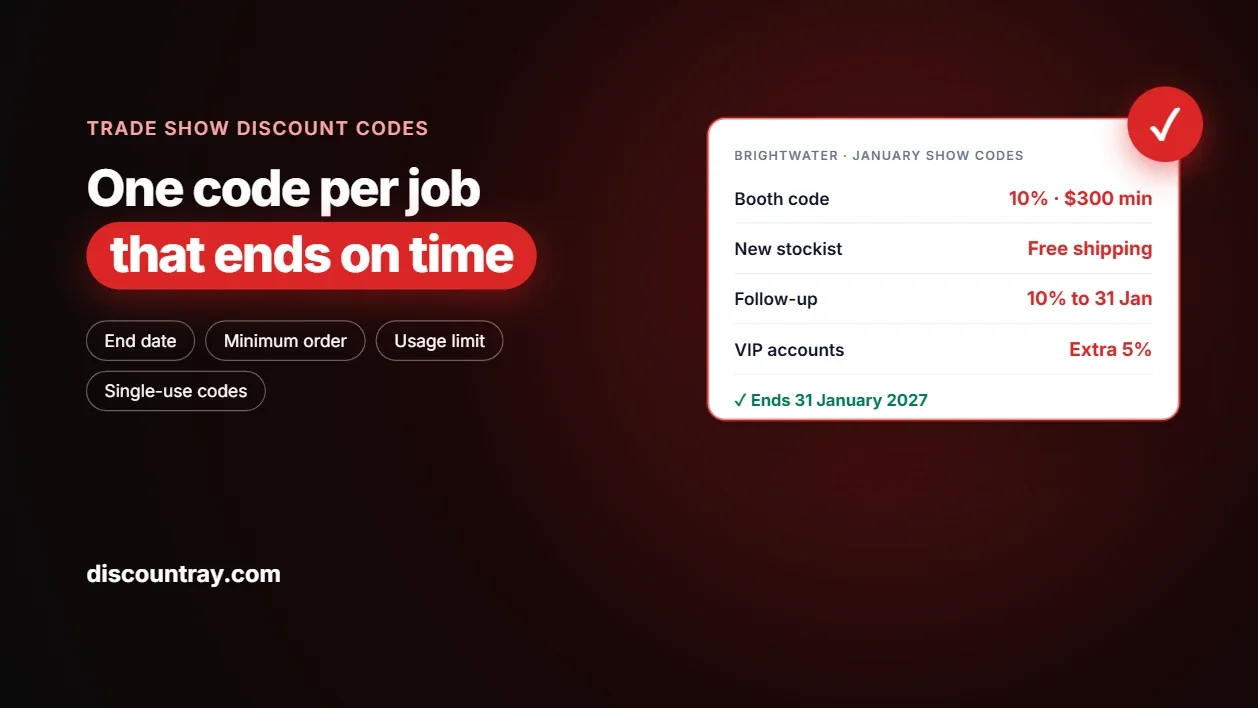
Trade show discount codes on Shopify work best when each code has one job: a show-only offer, a fixed end date, a minimum order and a usage limit that matches how many buyers you met. Create the codes before you travel, print them on the order sheet, and let them expire about two weeks after the show so buyers order while they still remember your booth.
Key takeaways
The January season is close. The Winter Atlanta Market runs 12 to 17 January 2027, according to AmericasMart. Set up codes in December.
Show specials are normal. Big markets such as Las Vegas Market list exhibitors' show specials for buyers. Buyers expect one.
One code per purpose. A booth code, a new-stockist code and a follow-up code are easier to track than one code for everything.
Every code needs limits. Use an end date, a minimum order and a usage limit. Shopify supports all three on discount codes.
Single-use codes protect margin. A code tied to one buyer can't end up on a coupon site.
The order sheet that made no money
Picture a candle brand. Call it Brightwater Candle Co. Last January it took a booth at a gift market, printed "SHOW15 for 15% off" on its order sheet and went home with 80 new contacts.
Some of those buyers ordered within a week. That was the plan. But the code had no end date, so orders using SHOW15 kept arriving in May. One store used it on four reorders. Somebody posted it in a buyer group, and two stores the team never met used it as well.
The team still made sales. They just gave 15% away on orders that would have come in anyway, and they couldn't tell which orders the show had really produced.
The fix isn't to stop offering show specials. It's to set up codes that do one job each, end on time and tell you what worked.
Why trade show offers need their own codes
A discount at a trade show is doing a different job from a holiday sale. It's there to turn a conversation at the booth into a first order, fast.
That job has three parts:
Get the first order. Buyers meet dozens of brands in a day. A show offer gives them a reason to order yours this month instead of "sometime".
Make it easy to order later. Many buyers want to check their budget or their shelf space before they commit. A code that works on your Shopify store lets them order from the office.
Tell you what the show was worth. If the code is only used by show contacts, the number of redemptions is close to the number of show orders.
A general code like WELCOME10 can't do the third job. It mixes show orders with everything else. That's why we suggest a separate set of codes for each show.
Yeah, but buyers can just order at the booth. Some will, on paper or a tablet. Many won't. They take your catalog, compare it with the other booths and decide later. The code is for the buyer who walks away interested. If you only take orders at the booth, you lose the people who needed a day to think.
The January 2027 calendar
The dates matter because codes need a start and an end. Here's a simple calendar built around the Atlanta winter market. Swap in your own show.
When | What to do |
|---|---|
1 to 15 December | Decide the offers. Set the minimum order and the discount for each code |
15 to 23 December | Create the codes in Shopify or DiscountRay and test them with a wholesale test account |
2 to 8 January | Print order sheets and cards with the codes. Load the booth tablet |
12 to 17 January | Winter Atlanta Market (AmericasMart). Codes are live from the first show day |
18 to 20 January | Send follow-up emails with the code and a direct link to your trade page |
31 January | Booth code ends |
February | Review redemptions and order value per code |
16 to 18 March | Atlanta Spring Market, if you exhibit there too |
The end date on 31 January is our suggestion, not a rule. Two weeks after the show is long enough for buyers to get back to the office and short enough to create urgency. If your buyers order slowly, push it to mid-February.

Trade show discount code calendar for January 2027 markets
Four codes most brands need for a show
Most brands only need four types of code. Each one has a different audience and different limits.
Code | Who gets it | Example offer | Limits we suggest |
|---|---|---|---|
Booth code | Every buyer who stops at the booth | 10% off a first order over $300 | End date, minimum order, one use per customer |
New stockist code | Buyers who place a first order at the show | Free shipping on the first reorder | Single use, locked to the buyer |
Follow-up code | Buyers who took a catalog but didn't order | 10% off until 31 January | End date, minimum order, one use per customer |
VIP code | Your top existing accounts who visit | Extra 5% on show orders | Specific customers only, end date |
The offers above are examples. The right number depends on your margin, and we'll check that next.
A few notes on each:
Booth code. This is the one you print. Keep it short and easy to type, like BRIGHT27. Because it's printed, assume it will be shared, and give it firm limits.
New stockist code. This one rewards a decision. A single-use code tied to the buyer's email can't be passed on.
Follow-up code. Send it by email after the show, with a link straight to your trade page. A code in an email gets used more than a code on a card that ends up in a bag.
VIP code. Existing accounts often feel left out when the new-buyer offer is better than their own terms. A small extra discount for show orders keeps them happy.

Four types of trade show discount codes and their limits
Check the margin before you print anything
A show discount comes out of your margin, not your price list. Do the math before the codes are on paper. We cover this in more detail in our guide to calculating profit margins.
Here's Brightwater's math for one candle. The numbers are made up.
Line | Amount |
|---|---|
Wholesale price | $14.00 |
Cost to make and pack | $6.30 |
Gross margin | $7.70 (55%) |
Booth code, 10% off | –$1.40 |
Margin after the code | $6.30 (50% of the discounted $12.60) |
Shipping if you add free shipping | Work out per order, not per candle |
A 10% booth code leaves a 50% margin on this candle. A 20% code would leave $4.90 on a $11.20 price, or about 44%. Both might be fine for a first order. Neither is fine forever, which is why the end date matters so much.
Two more things to check:
Stacking. Shopify lets you decide whether a code combines with other discounts. If you also run tiered pricing for wholesale buyers, decide whether the show code applies on top. If it does, check the margin at your best tier, not your list price.
Free shipping. Free shipping on a small first order can cost more than 10% off. Pair it with a minimum order.
Yeah, but our competitors offer 20% at the show. They might. A bigger discount doesn't always win the buyer, though. Clear terms do: a low opening minimum, a fast ship date and an easy reorder. If you want to compete on price, do it on the first order only, with a single-use code.
Set the code limits Shopify gives you
Shopify's own discount codes already cover most of what a show code needs. According to the Shopify Help Center, you can set:
Active dates, with a start and end time. Times follow your store's time zone, so check it before you set a midnight end.
A minimum purchase, as an amount or a number of items.
Usage limits, for the total number of uses and one use per customer.
Customer eligibility, including specific customers or segments.
Combinations with product, order and shipping discounts.
Specific products or collections, if the offer is for one line only.
Shopify also notes that a code can apply to up to 100 specific customers, products or variants, and that a store has a cumulative limit of 20,000,000 codes. A show plan won't hit the second number, but the first one matters if you build a VIP code for a long list of named accounts.
Discount codes also work in Shopify POS, which helps if you take orders on a tablet at the booth.
Single-use and bulk codes
A printed booth code will travel. That's fine for a capped, short offer. For anything more generous, use codes that only one buyer can use.
There are two ways to do this:
Bulk unique codes. You generate a batch, such as 100 codes, and hand one to each buyer on a card. Each code works once. You can see exactly how many were used.
Personalized single-use codes. A code is locked to one buyer's email address. Even if it's shared, nobody else can redeem it.
Shopify supports generating codes in bulk through apps and its API. Several App Store apps do it, such as Seguno's Bulk Discount Code Bot. DiscountRay includes it too, and we'll walk through that below.
How to set up trade show codes with DiscountRay
DiscountRay's code tools were added on 17 September 2026, according to the DiscountRay changelog. Codes can be created in three modes: Standard (one code many buyers share), Personalized Single-Use (a code locked to one email address) and Bulk Generate (a batch of unique codes). The same update added a Margin Safety meter and a Discount Simulator, so you can see the effect on margin before you save.
Here's how Brightwater would set up its January codes. Menu names may change over time.
Install DiscountRay and open the Create page. Since 20 November 2026, the Create page shows a catalogue of six discount types to start from.
Create the booth code in Standard mode. Name it BRIGHT27, set 10% off, a $300 minimum, one use per customer and an end date of 31 January.
Limit it to your wholesale customers if the show offer shouldn't work for retail shoppers. DiscountRay's Growth plan lists B2B pricing by customer groups and tags.
Check the Margin Safety meter before you save. If it warns you, lower the discount or raise the minimum.
Bulk generate new-stockist codes. Make a batch of 100 single-use codes for free shipping on the first reorder. Print them on cards.
Create personalized follow-up codes for buyers whose emails you collected at the booth, each locked to that buyer.
Schedule everything. Set the start on the first show day and the end on your deadline.
Test with a wholesale test account and a retail test account. Make sure retail shoppers can't use the booth code.
DiscountRay's Growth plan is $14 a month and lists bulk and personalized codes, B2B pricing by groups and tags, and scheduling. The free Starter plan covers quantity and tiered discounts. Prices are from the App Store listing on 23 November 2026, with a 14-day trial.
One limit to know: since 14 October 2026, DiscountRay blocks a discount that targets more than 100 items, including codes. That matches Shopify's own 100-item limit. If your show offer covers your whole catalog, apply it to a collection instead of picking products one by one.

Set up trade show discount codes with DiscountRay in 8 steps
What to print on the order sheet
The code is only useful if buyers can find it a week later. Put these on your order sheet and on a small card:
The code in large type, and nothing that looks like it (avoid O and 0, I and 1).
What it gives, in one line: "10% off your first order over $300".
When it ends, with the date written out: "Ends 31 January 2027".
Where to use it, as a short URL or a QR code to your trade page, not your home page.
Your ordering rules, like opening minimum and case packs, so the buyer isn't surprised later.
A QR code that opens the trade page with the code already in the link saves the buyer a step. Shopify lets you share a discount link that applies the code automatically. Test it from a phone before you print 500 cards.
The follow-up email
Most show orders come after the show. A good follow-up email is short and has one action.
Here's a sample Brightwater could send on 19 January:
Subject: Your Brightwater show offer ends 31 January
Hi Dana, it was good to meet you at the market. As promised, here's your show offer: 10% off your first order over $300 with code BRIGHT27, until 31 January.
Our spring scents are on the trade page, with case packs and ship dates: (link to your trade page)
Reply to this email if you'd like samples first.
Keep the email personal. Mention one thing you talked about at the booth if you can. And send it within a few days of the show, while the buyer still remembers your table.
Measure what the show produced
After the deadline, check each code. This is where separate codes pay off.
Measure | Where to find it | What it tells you |
|---|---|---|
Redemptions per code | Shopify discount reports or the app | How many orders each offer produced |
Order value per code | Orders filtered by code | Whether the minimum was set right |
New vs existing customers | Customer records | Whether the show found new stores |
Reorders by 31 March | Orders from show customers | Whether show buyers stay |
Discount cost | Total discount per code | What the show offer really cost |
Brightwater's made-up result: 80 contacts, 31 booth code orders, 12 new stockist codes used, 9 follow-up code orders. Average first order $410. Total discount given: about $1,900. That's a clear number to compare with the booth cost when you plan next year.
Yeah, but some buyers will order without the code. They will, and that's good news. Count them too, by tagging show contacts in Shopify. Orders without a code tell you the show worked even for buyers who didn't need a push.
What to do when a buyer misses the deadline
It will happen. On 4 February, a gift shop owner emails: "I meant to order last week. Can I still use the show code?"
You have three good options, and one bad one.
Say yes, once, with a personal code. Create a single-use code locked to that buyer's email, with a short end date like seven days. The public booth code stays closed, and the buyer still feels looked after.
Offer something smaller. Free shipping on the first order instead of 10% off. It keeps the deadline meaningful for everyone who ordered on time.
Say no, kindly, and point to the next offer. "The show offer has ended, but our spring reorder offer opens on 1 March." This works best when you really do have a next offer.
The bad option is to reopen the booth code for everyone. Buyers learn that your deadlines move, and next year fewer of them order on time.
Write down which option you'll use before the show, so the whole team gives the same answer. A short line in your notes is enough: "Late requests until 14 February get a personal code. After that, no."
Common mistakes with trade show codes
We've seen these often enough to list them. For more general mistakes, see our post on Shopify discount mistakes.
No end date. The code keeps working for months, on orders you'd have had anyway.
No minimum. Buyers place a tiny "test" order at a big discount.
One code for everything. You can't tell the show from your other promotions.
Code works for retail shoppers. A printed code ends up on a coupon site and your retail margin drops.
Wrong time zone. A code set to end at midnight in your store's time zone may end hours early or late for buyers elsewhere.
Stacking by accident. The show code combines with tiered pricing and a free shipping offer, and the margin disappears.
Testing on show day. Test every code in December, with real test accounts, before anything is printed.
When a show code isn't the right tool
Not every show offer should be a code.
Tiered pricing for big orders. If your offer is "buy more, pay less", a tiered or volume discount on the trade page is clearer than a code. Our guide to discount thresholds on Shopify covers how to set the levels.
Custom terms for one account. A regional chain that negotiates its own pricing needs a price list or a B2B catalog, not a code.
Net terms or deposits. Codes don't change how or when a buyer pays. Use Shopify B2B payment terms for that.
What DiscountRay doesn't do here
DiscountRay creates and schedules the discounts. It doesn't:
Collect buyer emails at the booth. Use a tablet form, a scanner or your show's lead tool.
Send the follow-up email. Use your email tool, with the code pasted in.
Approve new wholesale accounts. Shopify customer accounts or B2B companies handle that.
Take payment terms. Payment works the way your Shopify checkout or B2B terms work.
Set up your January codes this week
Pick your main show. Install the B2B wholesale discount app DiscountRay, create one booth code with an end date and a minimum, check it in the Margin Safety meter, and test it from a wholesale test account. Then add the single-use codes for new stockists before you print the order sheet.
For more on codes tied to one buyer, read our post on personalized discounts for Shopify.
Frequently asked questions
How do I create a trade show discount code on Shopify?
How long should a trade show discount last?
Should a trade show code work for retail customers?
Can I make a code that only one buyer can use?
Do Shopify discount codes work at the booth on a tablet?

Anika Anamta Mehnaz
This article is written by Anika Anamta Mehnaz, a Content Writer and Content Marketing Strategist specializing in Shopify, eCommerce, and SaaS. With over four years of content writing experience, she creates SEO and AI search-optimized content that helps Shopify merchants make better business decisions through practical, research-backed insights. Her work covers Shopify apps, product variants, bundles, discounts, B2B commerce, and conversion-focused strategies. Outside of work, Anika enjoys watching anime, reading John Grisham novels, and discovering new ideas in digital marketing and e-commerce. If you enjoy discussing Shopify, content marketing, or online growth, feel free to connect with her. Twitter: https://x.com/mehnaz2201 Medium: https://medium.com/@mehnaz_78932
This article was reviewed by the DiscountRay Technical Support Team, who regularly helps Shopify merchants test discount setup, customer eligibility, cart behavior, and checkout-related discount issues.