A Shopify quantity break is a pricing rule that lowers the price per unit when a customer buys more of the same product in one order. Merchants use them to push up average order value, move through stock that isn’t selling fast enough, or reward customers who are already buying more than one at a time. This piece breaks down what quantity breaks are, the different ways they can be priced, and when they’re actually worth setting up, whether you handle it manually or through one of the shopify quantity breaks apps built for it.
Summary
Say you sell a vitamin C serum. A shopper buying one bottle pays $28. Buy three, and the price drops to $24 each. Buy six or more, and it drops to $21 each. That’s a quantity break: the unit price falls in steps as the order quantity climbs, all in one transaction, with no separate code to remember or apply.
You’ll also see this pricing model called a volume discount, a bulk discount, a quantity discount, or tiered pricing, and depending on which site you’re reading, those terms get treated as exact synonyms or as genuinely different things. In practice, “quantity break” is the most literal name for it, since the price breaks at set quantity thresholds. The finer distinctions between quantity breaks, volume discounts, and tiered pricing matter if you’re deciding on a pricing structure, and that comparison deserves its own space rather than a quick aside here.
Quantity breaks aren’t a single pricing mechanic. Most stores use one of three structures, and the right one depends on the product and the margin you’re working with.
Shopify does have a native way to set up quantity breaks, but it’s more limited than most merchants expect. Through Markets > Catalogs, you can set up to 10 price breaks per product, applied per variant, so a customer needs to hit the quantity threshold on a specific variant rather than the product as a whole. The catch is that this feature works for B2B company accounts only, not regular storefront visitors. So if your customers check out as retail shoppers rather than approved wholesale accounts, this native tool won’t reach them.
Getting quantity breaks in front of everyday storefront customers without that B2B requirement takes a different approach, and that’s worth its own dedicated look rather than a few lines here.
If your store needs quantity breaks visible to everyday storefront customers rather than just approved B2B accounts, an app is the practical route to get there. It’s worth comparing the best Shopify quantity break apps side by side before installing anything, since setup time, variant-level control, and how the pricing actually displays on the product page vary a fair amount from one app to the next.
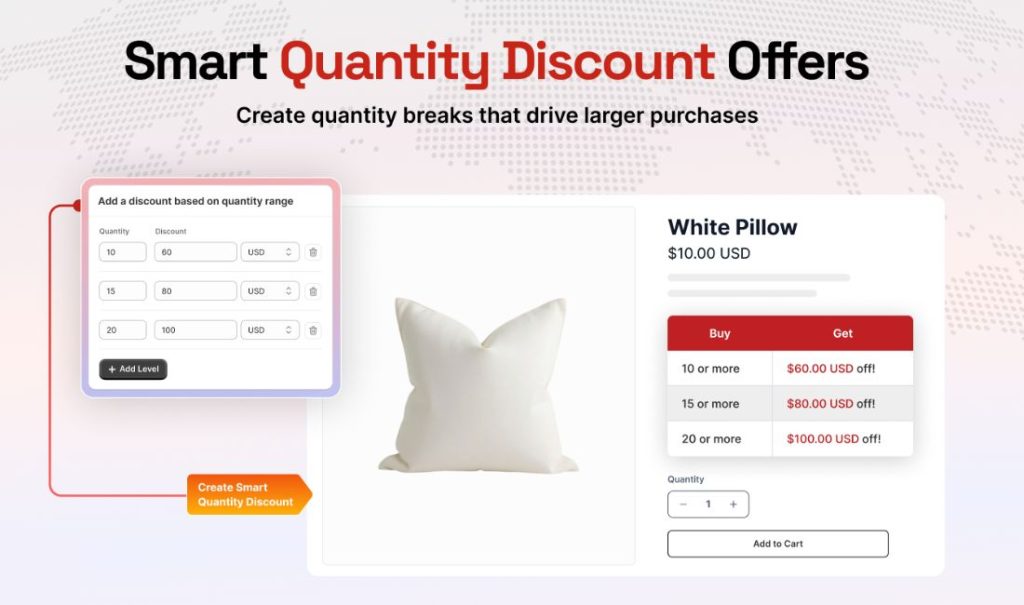
Raising average order value on repeat-purchase products works well when the item is something a customer already uses regularly and won’t mind having more of on hand, cleansers, supplements, coffee, and other skincare staples included. A quantity break turns “I’ll grab one more just in case” into an easy decision instead of a special task.
Clearing inventory that’s moving too slowly is one of the most practical uses, especially heading into a season change or before a product gets discontinued. Rather than a blanket sitewide sale that cuts into full-price sales elsewhere, a quantity break only kicks in on the specific product you need to move, and only once the customer commits to buying more of it.
Meeting bulk requests from your regular customers without building out a full wholesale program. Some stores get the occasional message asking for a break on a larger order, and a quantity break gives those customers a self-serve way to get that pricing without a manual quote every time.
Multi-packs on products people naturally buy more than one of are common in skincare, supplements, and anything consumable. If a customer is going to buy three anyway, a small price break rewards that instead of leaving it invisible.
Quantity breaks aren’t automatically a good idea just because they’re easy to set up. On thin-margin products, a discount that looks reasonable on paper can wipe out your actual profit once you calculate it against your real cost, not just the sticker price. This is a real problem merchants run into: it’s come up on Shopify’s own community forums, where a store owner found that a quantity break was stacking on top of an item already reduced through its compare-at price, cutting the margin far more than intended.
Made-to-order or highly customized products don’t usually fit either, since the appeal of a quantity break relies on the item being simple to produce and ship in volume without extra work per unit. Products typically bought as one-off gifts or single purchases, like a single piece of jewelry or a one-time home decor item, also rarely benefit from a quantity break, since customers aren’t naturally buying multiples of those in the first place.
Can I set up quantity breaks without installing an app?
Yes, if your customers are approved B2B company accounts, since Shopify’s native volume pricing in Catalogs handles it directly. For regular storefront customers, Shopify doesn’t offer a built-in way to do this, so most stores use an app or a manual discount code workaround instead.
Will a quantity break cut into my margin if the item’s already discounted?
It can, especially if the quantity break stacks on top of an existing sale price rather than replacing it. Always check your actual cost per unit at each quantity threshold before launching, not just the discounted retail price.
Can quantity breaks apply differently across product variants?
Yes. Shopify’s native B2B volume pricing lets you set different price breaks per variant, so a customer needs to hit the quantity threshold on that specific variant rather than the product as a whole. Apps built for general storefront quantity breaks typically offer similar variant-level control.
Does Shopify have quantity breaks built into the platform?
Only for B2B company accounts through Catalogs; regular storefront customers don’t get a native quantity break option. That’s the gap most merchants run into when they assume this is available out of the box.
Can I set breaks by quantity range, like 1 to 16 units at one price and 17 or more at another?
Yes, that’s exactly how quantity break tiers work, whether set natively for B2B or through an app for general customers. Each tier applies once the order quantity crosses into that range.
Shopify quantity breaks are a straightforward pricing rule at heart, the price drops as quantity rises, but where they actually earn their place is specific: repeat-purchase products customers already buy more than one of, slow-moving stock that needs a nudge, and regular customers who’d take a bulk deal if you offered one. They’re not a fit for every product; thin-margin items and one-off purchases usually don’t benefit. Whether you handle this through Shopify’s native B2B volume pricing or a dedicated app built for general storefront customers, the tiers only work if the math still holds at your real cost, not just the sticker price.
Get started with our free plan or unlock premium features with a 14-day free trial.
30-day money-back guarantee!



 English
  日本語
日本語  Français
  Deutsch
  Español
  简体中文
简体中文  Italiano